Automating sales invoicing: from order to invoice
For purchase invoices, automation is about saving time. For sales invoices it is about revenue that otherwise never goes out. Here is how to make sure everything you deliver actually gets invoiced, on time.
The other side of invoice processing
Invoice processing usually means incoming invoices: scanning, matching, approving, paying. Understandable, because there is a visible pile. But on the sales side something happens that often weighs more financially and gets far less attention.
With purchase invoices the question is how fast you process something. With sales invoices the question is whether it happens at all. Work that has been delivered but not invoiced does not sit as a pile on someone's desk. It disappears quietly, and nobody misses it until margin comes in below expectation.
That makes sales order processing and invoicing one of the few processes where automation does not just save cost but directly produces revenue.
Where invoicing gets stuck
At nearly every company the delay is not in producing the invoice itself. That step is usually a few clicks in the ERP. The delay is in knowing that invoicing is allowed.
- The delivery has gone out but the packing slip has not been processed, so the order is not flagged as billable.
- Extra work was agreed by email or phone, but it is recorded nowhere in the system.
- Hours were booked in a time app that does not flow into the order automatically.
- A partial delivery has shipped, but nobody knows whether you bill per partial delivery or only on completion.
- The customer needs their own purchase order number on the invoice and it is missing, so the invoice waits.
The result is a billing run, monthly or weekly, in which someone manually works out what is billable. That is exactly the kind of work that depends on one person's attention, and therefore exactly the kind of work where things fall through.
What it costs when it sits
There are three costs and they add up. The first is working capital: an invoice that goes out two weeks later gets paid two weeks later. At an average invoice value and any volume, that is a substantial amount structurally sitting with your customer instead of with you.
The second is revenue that never gets invoiced at all. Extra work nobody recorded, hours booked outside the order, a partial delivery that was forgotten. This is money you already spent on materials and labour that will never have an invoice against it.
The third is the argument. An invoice arriving six weeks after delivery invites questions. Right after delivery the customer remembers what it was about. Six weeks later an email thread starts that costs your people time and sometimes ends in a discount you propose yourself just to close it.
What you automate
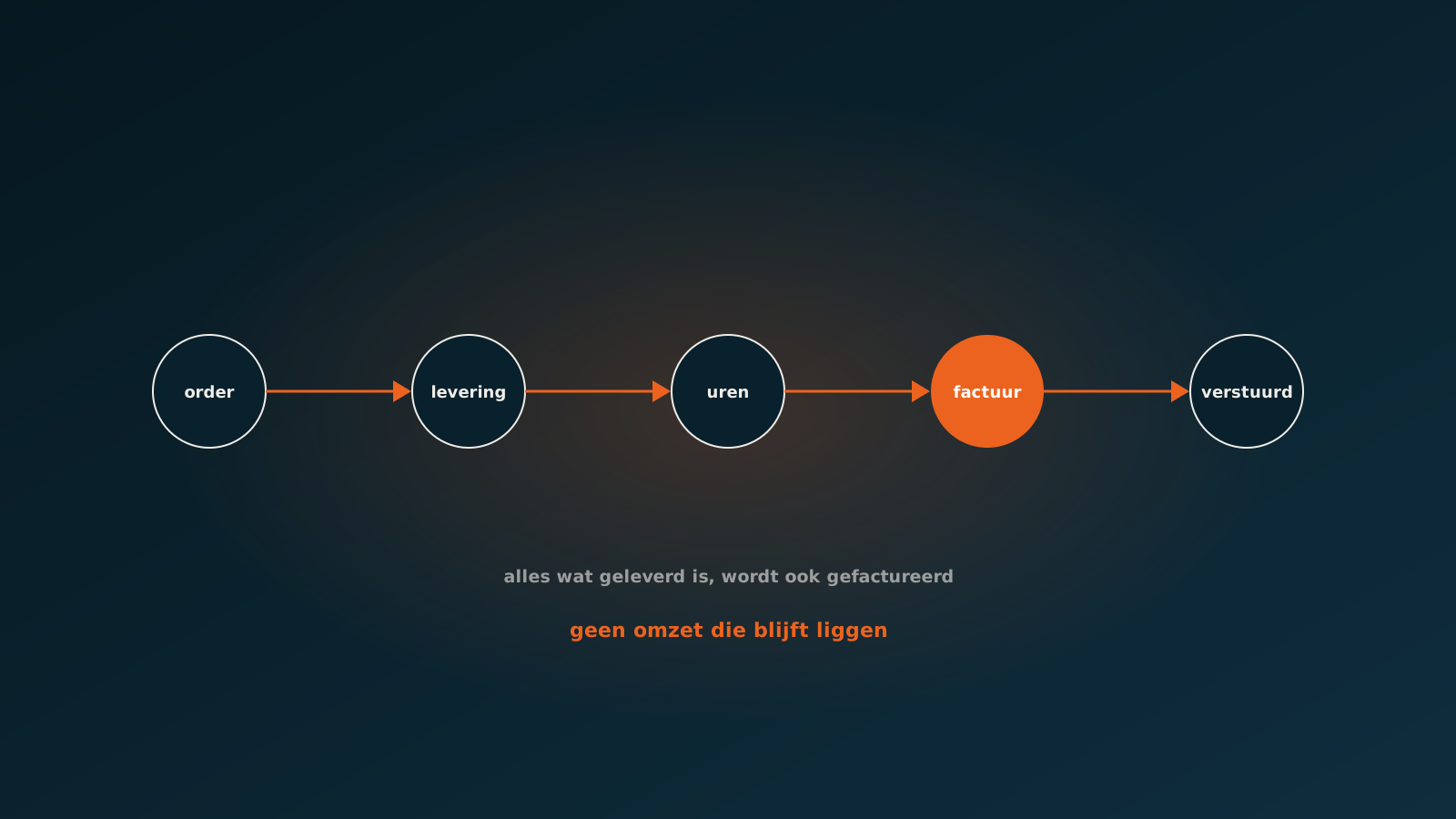
Automating sales invoicing does not start with producing the invoice but with completing the order. An AI coworker watches the chain from order to delivery to invoice and makes sure every step leaves its data behind.
Concretely: the agent reads the signed packing slip or service ticket that comes back, links it to the order, processes the delivered quantities and flags the order as billable. It pulls hours from your time registration and books them on the right order line. And it flags what is still missing before the invoice goes out.
- Delivery processed: packing slip or service ticket received and linked to the right order lines.
- Hours and materials complete: everything booked to the project sits on the order.
- Extra work recorded: deviations from the original assignment are visible and approved.
- Customer details complete: purchase order number, billing address and reference the way this customer needs them.
- Ready to send: the invoice is created and offered for approval or sent directly.
Invoices that are right the first time
Speed is only valuable if the invoice is also correct. An invoice rejected because the purchase order number is missing costs you more time than an invoice that goes out two days later but right.
So the agent checks up front against what this specific customer needs. Some customers refuse invoices without their own order number. Others want billing per project rather than per order. Others again have a portal where the invoice must be submitted in a particular format.
These are precisely the details an experienced billing clerk carries in their head and a new colleague takes three months to learn. Recorded in the agent, they apply from day one, for everyone and on every invoice.
Where the human stays in the loop
Invoicing is a process where you want to choose deliberately how much you let go. Standard invoices based on a delivered order can go out without intervention, because the data comes straight from the order and the delivery.
For extra work, for projects with milestones and for large amounts, you almost always want a person's approval. The agent prepares the invoice, shows what it is based on and puts it forward. The person responsible looks and approves.
That keeps the judgement where it belongs while the collecting work disappears. And because the agent always shows where an amount comes from, the check is faster than if someone had to work it out themselves.
Getting started
A good first question: how many days on average sit between delivery and invoice, and how many orders currently sit as delivered but uninvoiced for more than a month? That second number is usually the most confronting and the most convincing.
In a Quick Scan we walk through your order-to-invoice chain and show which steps an AI coworker can take over in your ERP. Typically you are live within eight weeks. Plan your go-live whenever it suits you.
Curious what an AI coworker can do for your process?
Book a no-strings Quick Scan and explore the options.
Book a Quick Scan